Tech Update, September 2026: notes from the Digital Hub
Last night was another Digital Hub, and I came away from this one thinking we’d managed to hit quite an interesting point in the AI conversation.
Every couple of months I stand up there and try to give some kind of update on what has happened since the last event, and that job is getting increasingly ridiculous. I normally start building the slides a week or so beforehand, trying to work out which developments actually matter and which ones are just noise, and this time the whole thing had pretty much changed again by the time I stood up to deliver it.
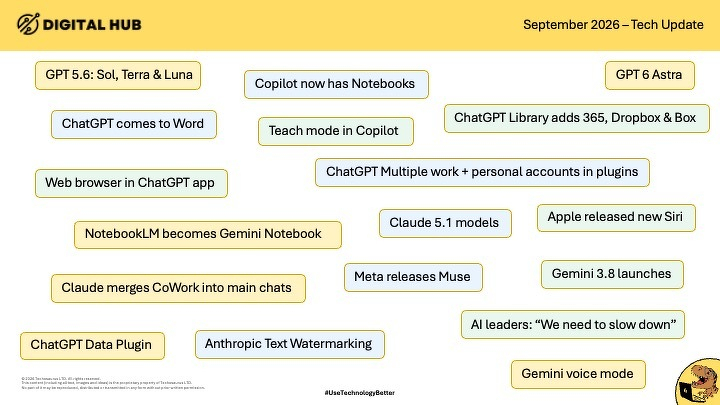
I joked that I hadn’t bothered updating the slides the night before because, realistically, I could have updated them again the following morning. GPT had moved again, Copilot had new capabilities, Anthropic were talking about watermarking AI-generated text, Meta had launched something new, Gemini had moved forward, ChatGPT was becoming much more connected to the rest of your digital life, and that was only scratching the surface.
The pace is getting faster
There is something quite important buried in that pace though. AI is increasingly being used to build AI. The tools available to researchers and developers today are helping them create the tools we will use tomorrow, which means the development cycle keeps getting shorter. And I think that is where some of the more serious conversations around AI safety deserve a bit more nuance than they tend to get in the headlines.
Industry experts call for a slow down on the frontier
There has been a lot of noise recently around the leaders of the big AI companies saying development needs greater control. Naturally, that very quickly turns into headlines about AI killing everybody, machines escaping, or humanity being finished by Thursday lunchtime. My view is quite a bit calmer than that.
I used an analogy when I spoke to the BBC recently that I still think works. These companies are building the equivalent of a land-speed-record car. They are trying to make the thing go faster and faster, seeing what is possible, and pushing everything they have at it. Somebody needs to be working on the brakes at the same time.
The bit I think gets lost is that when people such as Anthropic, OpenAI, Google and others talk about frontier AI risk, they are often talking about systems that you and I cannot use. These are enormous models being developed with phenomenal amounts of computing power, access to huge infrastructure, and capabilities sitting well beyond the ChatGPT box most of us open every morning. That distinction matters to me because I don’t want ordinary people becoming scared of using useful technology because a headline has bundled everything carrying the letters “AI” into one bucket.
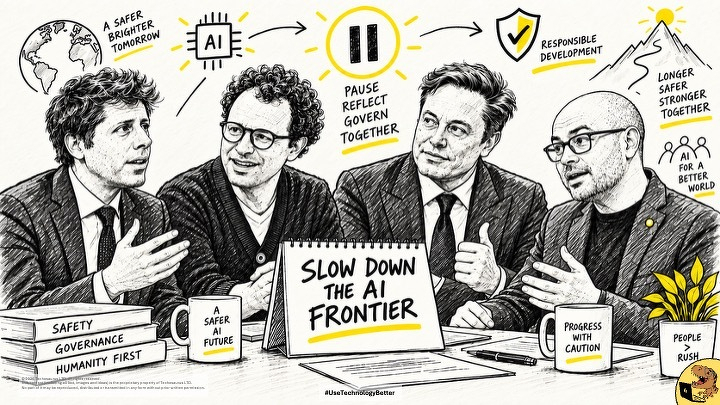
I absolutely think the frontier needs controls. If you are about to train something using an unimaginable amount of computing power and deliberately push it until you discover where its limits are, there should probably be some external oversight around that. Tell people what you’re doing, have independent people testing it, and build the brakes alongside the engine. That seems quite sensible to me.
Anthropic text watermarking
Where the conversation became really interesting last night was when I moved into Anthropic’s experiments around text watermarking.
I do a lot of work in education, and one of the questions that comes up constantly is some version of, “How do we stop students getting AI to do their work?” My answer has been pretty consistent: teach them how to use it properly. Get them to critique what AI produces, ask them to find the holes in an answer, give them something AI has written and get them to mark it. Make judgement part of the exercise.
The current crop of AI detectors have never convinced me. You can upload writing produced long before ChatGPT existed and some of them will confidently tell you it was produced by AI. Frankenstein is one of my favourite examples, because AI has effectively learned from material like that, so an AI detector sees familiar patterns and concludes that AI must have written it. That isn’t proof. It’s a probability dressed up with a percentage sign.
Anthropic’s idea is much cleverer. I went back to how an LLM actually produces language: at every point when it is generating text, there are lots of possible words it could choose next. Some are more probable than others, and sometimes several possible words are close enough that choosing any of them would produce perfectly sensible English. Anthropic are experimenting with subtly controlling those choices using a secret pattern.
The reader wouldn’t see anything strange. The sentence would still mean the same thing, and there wouldn’t be a weird invisible character sitting in the text or something you could remove by changing the font. The pattern would exist in the choices the model made while writing. If Anthropic kept the key to that pattern, they could potentially take a piece of work later and recognise that their model had produced it, and change some of the words and it might still recognise large chunks of the statistical pattern.
I find that fascinating, and inevitably my brain starts wandering into what happens next. Maybe each model gets a different pattern, maybe those patterns rotate monthly, and perhaps one day a provider could identify that something came from their model, which model produced it, and roughly when it happened.
There are some pretty chunky ethical conversations wrapped up in that, especially in education. There is also the question of whether we always care. If somebody is meant to be demonstrating their own academic understanding and AI has quietly written the entire thesis, I care. If somebody used AI to help clean up the wording of an email that already contained their thoughts, I really don’t. We need to get much better at judging the use rather than simply detecting the presence of AI.
Future gazing: the harness
Then I got onto something I am increasingly fascinated by, which is the move from AI producing things for us towards AI actually doing things with us.
There is a word creeping into the AI world at the moment: “harness”. I hate it. Every time I hear 2 geeks asking each other which harness they are running, I picture something involving horses or a dungeon. What they actually mean is the collection of tools surrounding the AI.
The easiest way I can describe it is a ball sitting inside a doughnut. The ball in the middle is the LLM, the brain. Around it is everything that brain is allowed to interact with: files, email, calendars, browsers, software, databases, and whatever else you choose to connect. Then when a better brain comes along, you can swap the ball in the middle and leave the surrounding tools in place.
That is becoming increasingly important, because some of the most interesting experiences I’ve had with AI recently had very little to do with asking it questions.
Remote mode
A couple of weeks ago I went to iAero to deliver a training day. It was the first day back at school, the house had been slightly chaotic that morning, and I arrived at iAero, connected everything up, opened my bag and realised I had forgotten my laptop. Brilliant. Luckily we have some spare training laptops, which I tend to think of as the backup car on Top Gear: they technically work and will get you where you need to go, although you wouldn’t necessarily pick one voluntarily.
The training itself was fine because almost everything we use is cloud based. Later in the day though, the learners were working independently and I wanted to use the time to work on a tender I’d been developing for about 6 weeks. I opened OneDrive on my phone, went into the client folder, went into the tender folder, and there was nothing there. That is a slightly horrible moment when you know how much work should be sitting in that folder.
My actual laptop was at home, switched on and connected. So I opened ChatGPT on my phone and used its remote connection to the desktop app running on the laptop, and I literally started talking to my computer.
“Can you look in my Downloads folder and tell me if there are any Word documents in there?”
Nothing.
“Can you go into OneDrive, into Work in Progress, into the client folder, and then into the tender folder?”
Yep. Files were there.
So now I knew what had happened: OneDrive had stopped syncing. I asked it to stop the OneDrive process and restart it, ChatGPT explained the command it was going to run, I approved it, and about 20 seconds later the files appeared on my phone.
I had this little moment where I thought: this is quite a big deal. I hadn’t remotely connected to Windows, I hadn’t tried to click around a tiny desktop interface on my phone, and I hadn’t opened Task Manager or typed a terminal command. I’d explained the problem, and the computer dealt with the computer bit.
The new Siri, and the interface starting to disappear
That idea came up again when I talked about the new Siri. I’ve been playing with the newer iPhone capabilities, and the interesting part for me is that Siri can increasingly understand what is happening across the operating system.
The other day I was driving home after picking my car up from a service and Ellie messaged me asking for an eBay email I’d forgotten to send her. Siri read the message to me while I was driving, then asked whether I wanted it to find the email and send it to Ellie. Yep. It found the relevant email and forwarded it while I carried on driving, and by the time I stopped I had the notification confirming the item had already been collected.
There are lots of perfectly sensible conversations we should have about privacy and access around that stuff, and somebody asked me about exactly that later in the Q&A. The technology itself though is getting very interesting, because the interface is starting to disappear. I don’t really want to open an AI tool, then open my email, then copy something across, then open another application, then tell the AI about that. I just want to explain what I’m trying to achieve.
That idea became even stranger during some work I was doing with Shane recently. I had started preparing a job description and had already given ChatGPT some context, and because I knew I needed to leave, I basically told it that I was about to get in the car and we would continue the conversation through voice mode. Once I was out of Yeovil and had a decent signal, I opened the conversation again and carried on talking.
It interviewed me about the role. We talked through what the person would be responsible for, what I wanted from them, how the job should work, and all the usual bits. Then I asked it to send the information to Shane, because he was helping me check the role, and I gave it one specific instruction: don’t pretend to be me. Tell Shane that you’re ChatGPT and that I’m driving.
When I got to the hotel later, I had a message from Shane saying something along the lines of, “Mate, I’ve just had a conversation with your ChatGPT.” The email basically started with, “Hi Shane, it’s ChatGPT here. Scott’s driving…”
And I really liked that. There is sometimes this weird assumption that if AI is involved, we have to hide it and make everybody believe a human typed every character, and I’m increasingly comfortable with the AI simply saying what it is. I’ve now done similar things when working on our Round Table charity auction, where AI has helped research organisations we could approach, find appropriate contact details, understand what they might realistically be able to contribute, and then prepare personalised emails. At that point AI starts feeling much more like delegated support than a clever writing tool.
CoWork in the Cloud
And then we get into Cowork, which is probably where my head is going fastest at the moment.
I’ve been letting AI work with folders and files on my local computer for some time. My Work in Progress folder syncs into OneDrive, partly because I had a feeling we would eventually reach the point where the same thing could happen from anywhere.
We’re currently doing some work around Agri AI. People have been registering interest, information has been coming into my inbox, and we have a spreadsheet tracking everyone. My existing process was already fairly automated: I’d move the emails into a folder and occasionally ask the AI on my computer to pull all the details out, update the spreadsheet, tidy everything up and create the information we needed.
Then one evening I was playing skittles with Round Table and was painfully aware I was behind on work. So, couple of ciders in, I pulled out my phone.
“Can you see all the Agri AI emails in my inbox?”
Yep.
“Can you see the Agri AI folder in SharePoint?”
Yep.
“Can you see the spreadsheet?”
Yep.
At that point I basically said, “You can probably see where I’m going with this.” I asked it to take the information from the emails, update the spreadsheet, put the source emails into the correct place in SharePoint, and then file the emails away when it had finished. Then I went back to playing skittles, and when I checked later, it was done.
That is the bit I keep thinking about. For years, when we talked about automation, we talked about workflows: trigger happens here, data goes there, condition gets checked, another action happens. I still love that stuff. This feels different because I can describe the job rather than build every individual step.
There is a very important caveat though, which is that I’m still being quite deliberate about how I delegate. I ask whether it can see the right information, I check which folders it has access to, I talk through the steps, and I think about the risk before giving it permission to do something. That is going to become a much bigger skill, because if AI becomes capable of acting on our behalf, our ability to give clear instructions and decide where authority begins and ends matters enormously.
Live demo
The live demo brought all of that together. I opened the ChatGPT desktop app and used the browser sitting alongside it, then told it I needed 4 little hand-drawn icons for a website I was building: home, back, forwards and refresh. Then I told it to open Excalidraw, create them, and save each one as an SVG. And off it went.
My hands weren’t on the mouse. The cursor on the screen belonged to the AI, and it had to work out how Excalidraw worked, find the controls, make the drawings, export them and save the files.
While it was doing that I talked about another task we have when setting up Skills Bootcamps. We create learner folders in SharePoint, then have to go through the permissions on each folder, break inheritance, add the individual learner and make sure they can only see their folder. It’s boring, and it takes ages. Usually either Ellie or I end up doing it, which means expensive founder time is being spent repeatedly clicking the same buttons.
So recently I opened the SharePoint site with ChatGPT watching, completed the first learner myself, then essentially said: “Did you see what I just did? Can you do that for everybody else on this list?” It said yes, and I went and made a coffee. That is exactly the sort of AI use I want more of. Give me back the bits of my life where I am basically acting like a slow biological macro.
The Excalidraw demo finished as we were talking. It created the icons, exported the SVG files and saved them locally, and it did manage to put them into the wrong project folder because I was working inside the wrong project at the time, which actually made the demo better as far as I’m concerned. AI still screws things up. Fine. Nothing had gone live, the mistake was reversible, and I could see what had happened and fix it. That is normal work.
Where it has bitten me
One of the audience questions towards the end gave me the opportunity to talk about where this stuff has bitten me as well.
Earlier in the week I’d been doing another live demo and ChatGPT had access to my email, calendar, Teams and other parts of my working day. It spotted that Ellie had asked me for a link to one of our course forms. Perfect demo. Rather than me hunting through old emails trying to find it, I asked ChatGPT to find the most recent correct link, and it did. Then I said, “Can you send that to Ellie for me?”
“Done.”
Hang on. What do you mean, done? It had actually sent the email.
So I asked it to show me what it had sent, and it was horrific. Ridiculously formal. It sounded like I was some kind of Victorian chief executive issuing instructions to an employee rather than emailing my wife. I immediately told it to send another email explaining that ChatGPT had sent the previous one and that I would never normally speak to her like that, and the second email was considerably funnier.
More importantly, I changed the rule afterwards. ChatGPT now has an explicit instruction that any email it is about to send must be shown to me first.
That is a tiny example, but I think it is a useful one, because as these tools gain more agency our own rules need to keep evolving as well. I don’t want to remove the ability for AI to send emails, because it is incredibly useful. I want an approval gate.
And I suspect we are all going to have to get much better at thinking in those terms. What can the AI see? What can it change? What can it send? What can it do without asking me, and what needs a human thumbprint before anything happens? That feels like a much healthier conversation than either blindly handing everything over or becoming too frightened to use it.
Apps I’m using
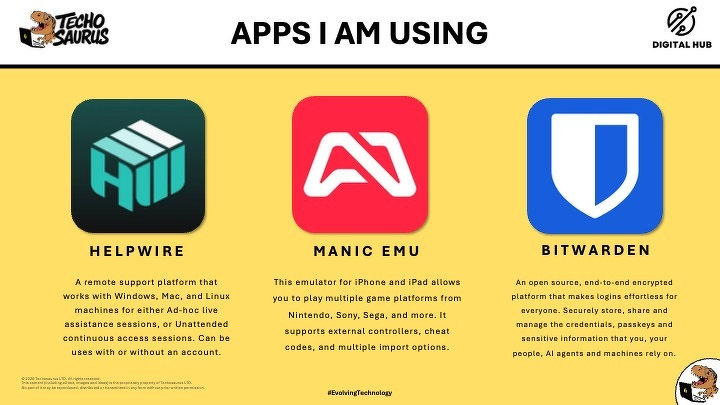
I finished, as always, with 3 bits of tech I’m enjoying at the moment: HelpWire for remote support, Manic EMU because sometimes technology should simply let you play Mario Kart: Double Dash on your phone on a train, and Bitwarden for password management and 2FA.
Then my completely non-AI tech tip was Apple Preview. If you use a Mac, you can sign PDFs without paying for Acrobat or installing anything else. You can draw the signature on the trackpad, sign using your iPhone, or hold a handwritten signature up to the camera and let Preview clean it up and save it for future documents.
The computer changing shape
Looking back at the whole thing, I think the bit I enjoyed most was that it wasn’t really a presentation about shiny new AI tools. It was about the computer changing shape.
For most of my life in technology, we’ve learned how computers want us to work. We learned the menus, the buttons, the applications, the keyboard shortcuts, the folder structures, and eventually the APIs and automation tools when we wanted systems to talk to each other. Natural language is starting to sit over the top of all of that, and once AI can use the same tools we use, the communication skill becomes even more important.
I can explain that OneDrive has stopped syncing and ask the computer to sort it. I can show it how to configure one learner folder and ask it to finish the others. I can describe 4 icons and watch it create them inside someone else’s software. I can tell it what needs doing with a pile of emails and let it get on with the admin while I play skittles.
The thing I keep coming back to is delegation. Good delegation has never meant throwing a vague instruction at somebody and disappearing. You give context, you explain the outcome, you make sure they have access to what they need, and you decide what they can do themselves and what needs to come back to you. AI is increasingly asking us to develop exactly the same skill.
And judging by the email it sent Ellie this week, I’m still learning too.